Tech Journal: Automating DMARC Report Parsing with parsedmarc, GNOME Keyring, and Systemd
Date: July 27, 2026
System: Arch Linux (scott-predatorph31751) / zsh + tmux
Author: Scott Diemer
Focus: Infrastructure / Mail Security / Automation
1. Objective
Automate the daily ingestion and parsing of incoming DMARC aggregate and forensic reports from mail.scottdiemer.com using parsedmarc, ensuring secure credential handling via GNOME Keyring without storing plaintext passwords in configuration files or unit definitions.
2. Infrastructure & Key Components
- IMAP Mail Server:
mail.scottdiemer.com - Account:
dmarc@scottdiemer.com - Credential Vault:
gnome-keyringviasecret-tool - Output Path:
/home/scott/dmarc_reports/parsed/ - Automation: Systemd User Service (
parsedmarc.service) & Timer (parsedmarc.timer)
3. Configuration Details
A. Credentials Setup (gnome-keyring)
Stored the IMAP authentication secret securely using secret-tool:
secret-tool store --label="DMARC IMAP Password" service dmarc_imap user dmarc@scottdiemer.com
B. Configuration File (~/.config/parsedmarc/parsedmarc.ini)
Configured parsedmarc to connect over implicit SSL (port 993) and output CSV tables directly to the designated target directory:
[general]
save_csv = true
output = /home/scott/dmarc_reports/parsed

[imap]
host = mail.scottdiemer.com
port = 993
ssl = true
user = dmarc@scottdiemer.com
read_only = false

[mailbox]
delete = false
C. Wrapper Script (~/.local/bin/run-parsedmarc.sh)
Created an executable wrapper script (chmod +x) that exports the D-Bus session address (allowing background systemd jobs to interface with GNOME Keyring) and dynamically injects the retrieved secret at runtime:
#!/usr/bin/env bash

# Required for secret-tool to access GNOME Keyring under systemd
export DBUS_SESSION_BUS_ADDRESS="unix:path=/run/user/$(id -u)/bus"

echo "Fetching password from GNOME Keyring..."
IMAP_PASS=$(secret-tool lookup service dmarc_imap user dmarc@scottdiemer.com)

if [ -z "$IMAP_PASS" ]; then
    echo "Error: Could not retrieve password from GNOME Keyring!" >&2
    exit 1
fi

echo "Password retrieved successfully. Executing parsedmarc..."
PARSEDMARC_IMAP_PASSWORD="$IMAP_PASS" /home/scott/.local/bin/parsedmarc -c /home/scott/.config/parsedmarc/parsedmarc.ini
D. Systemd User Units
Service File (~/.config/systemd/user/parsedmarc.service):
[Unit]
Description=Fetch and Parse DMARC Reports
After=network-online.target

[Service]
Type=oneshot
ExecStart=/home/scott/.local/bin/run-parsedmarc.sh
Timer File (~/.config/systemd/user/parsedmarc.timer):
[Unit]
Description=Run parsedmarc daily

[Timer]
OnCalendar=daily
Persistent=true

[Install]
WantedBy=timers.target
4. Issues Encountered & Resolved
-
Hanging Network Socket (
Ctrl+CNon-responsive):- Cause: Generic placeholder host (
your.mailserver.com) inparsedmarc.inicaused network calls to hang indefinitely waiting for a socket response. - Fix: Terminated hung process (
pkill -9 -f parsedmarc) and updated host tomail.scottdiemer.com.
- Cause: Generic placeholder host (
-
Missing Output Files:
- Cause: Using
output_directory = ...inparsedmarc.iniinstead of the required keyoutput = ....parsedmarcfell back to its default path (~/dmarc_reports/dmarc_parsed/). - Fix: Updated configuration key to
output = /home/scott/dmarc_reports/parsed.
- Cause: Using
-
Systemd Execution Failure (
status=203/EXEC):- Cause: Missing D-Bus environment session variable in systemd runner environment, relative binary paths, and execution permissions.
- Fix: Added
DBUS_SESSION_BUS_ADDRESSexport, specified absolute paths (/home/scott/.local/bin/parsedmarc), and reset systemd state (systemctl --user reset-failed).
5. Verification & Final Status
- Manual Service Test:
systemctl --user start parsedmarc.servicecompleted withstatus=0/SUCCESS. - Output Verification: Extracted CSV report files verified in
/home/scott/dmarc_reports/parsed/. - Timer Schedule:
systemctl --user status parsedmarc.timerconfirmedactive (waiting)and scheduled to run automatically at midnight (00:00:00 EDT).
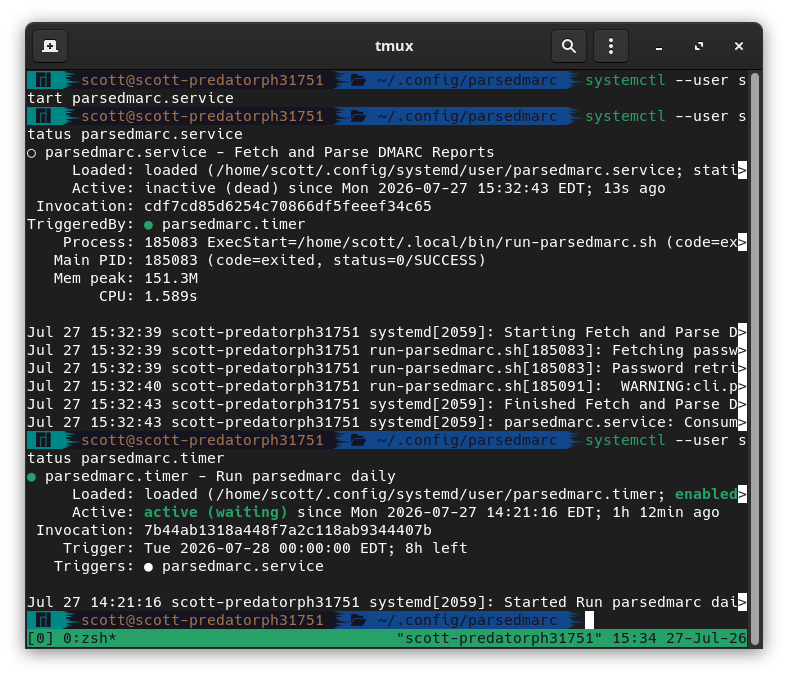
Figure 1: Successful execution of parsedmarc.service and active status of parsedmarc.timer in tmux.
Log Breakdown
- Service Execution (
parsedmarc.service): Exited cleanly withstatus=0/SUCCESS. The journal logs confirm successful DBus connectivity, secure password retrieval from GNOME Keyring viasecret-tool, and proper execution ofparsedmarc. - Timer Schedule (
parsedmarc.timer): Showing asactive (waiting)and enabled. The timer is set to trigger automatically at midnight (00:00:00 EDT) to execute the service on a daily basis.k