Deploying osTicket on a Live Nginx & PHP 8.1-FPM Server Stack
Target Domain: tickets.scottdiemer.com
Environment: Live Ubuntu Production Server
Tech Stack: Linux (Ubuntu), Nginx, PHP 8.1-FPM, MySQL/MariaDB, osTicket 1.17+
1. Executive Summary
As part of deploying a live ticketing system, I installed osTicket (v1.17+) on an Ubuntu server running an Nginx and PHP 8.1-FPM web tier. Because osTicket is natively developed for Apache web servers using .htaccess rewrite rules, running it on Nginx introduces routing challenges for dynamic AJAX endpoints.
This journal entry covers the root cause analysis of the PATH_INFO routing breakdown, configuring explicit FastCGI location rules, resolving active configuration file symlink mismatches, and establishing secure IMAP/SMTP mail loops on a live server.
2. The Technical Challenge
In standard Apache deployments, osTicket uses .htaccess to handle dynamic sub-paths like /scp/ajax.php/email/1/config. On a standard Nginx configuration, Nginx doesn't natively parse these trailing path parameters and instead falls back to the root handler (location /).
In the osTicket administration panel, this caused modal dialogs to break. When trying to configure email mailboxes, the pop-up modal fetched the entire web portal’s homepage HTML instead of parsing the expected JSON response.
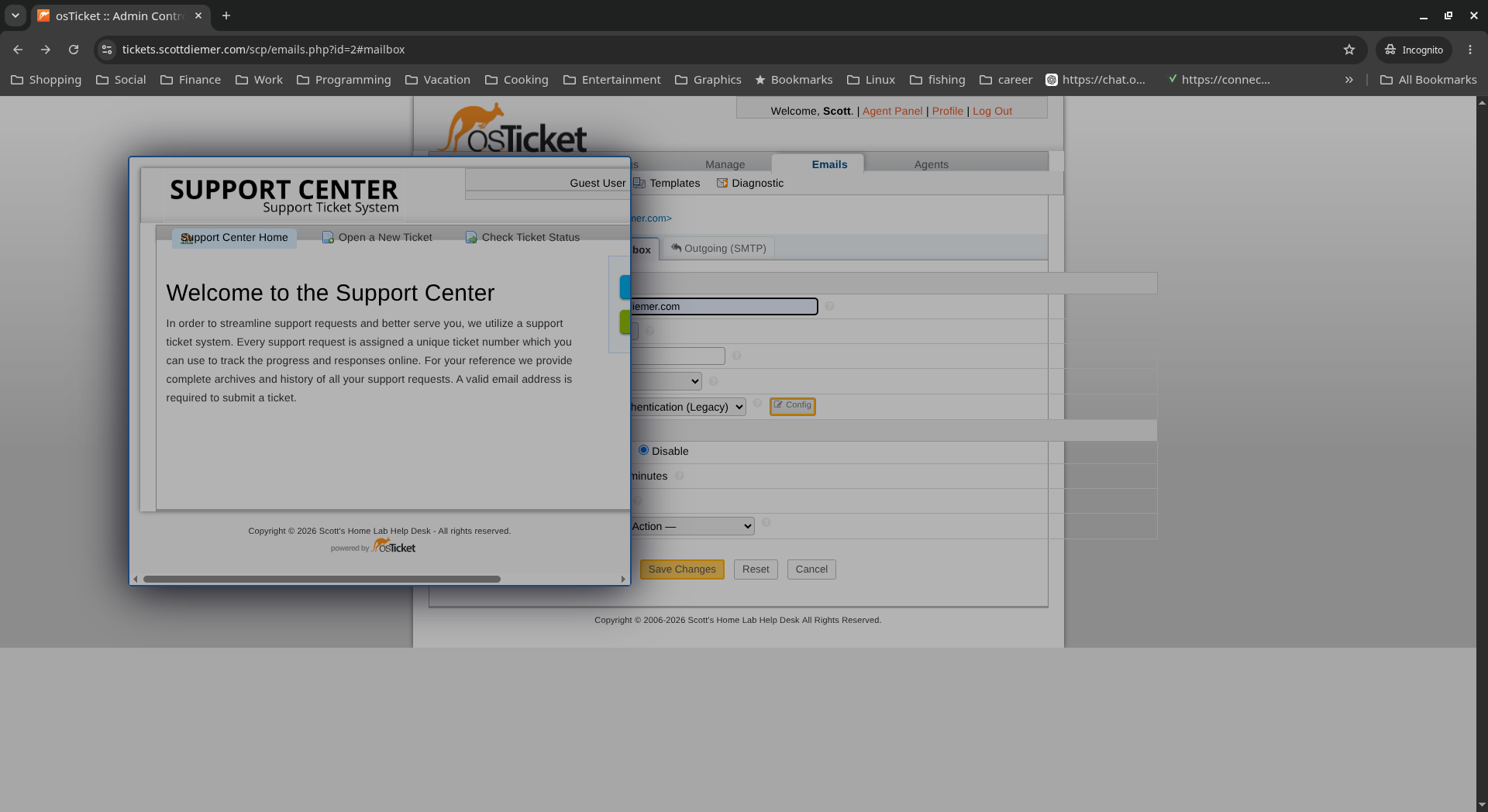 Figure 1: Initial failure state — Missing FastCGI PATH_INFO rules caused Nginx to serve homepage HTML inside the configuration modal.
3. Engineering the Solution
To resolve the routing issue, I engineered custom regular expression location blocks inside the Nginx virtual host configuration. These blocks intercept requests aimed at ajax.php, isolate the URL sub-paths, and explicitly pass PATH_INFO parameters to the PHP 8.1-FPM Unix socket:
Nginx:
location ~ ^/scp/ajax\.php(/.*)?$ {
	include fastcgi_params;
	fastcgi_param SCRIPT_FILENAME $document_root/scp/ajax.php;
	fastcgi_param SCRIPT_NAME /scp/ajax.php;
	fastcgi_param PATH_INFO $1;
	fastcgi_pass unix:/var/run/php/php8.1-fpm.sock;
}
4. Troubleshooting Active Symlinks
While testing the configuration, syntax checks passed (sudo nginx -t), but reloading Nginx produced no change in the live app's behavior.
Upon deeper investigation of /etc/nginx/, I found an active file conflict: the server was actively loading a configuration block located at /etc/nginx/sites-enabled/osticket, while my edits were being applied to an unlinked file at /etc/nginx/sites-available/tickets.scottdiemer.com.
Key Takeaway: When server configuration edits do not reflect in live behavior, always verify active symlinks in /etc/nginx/sites-enabled/ to ensure you are modifying the file Nginx is actively reading.
Once the FastCGI location rules were added to the active /etc/nginx/sites-enabled/osticket block and Nginx was reloaded (sudo systemctl reload nginx), the issue was resolved. The modal dialogs loaded cleanly as expected.
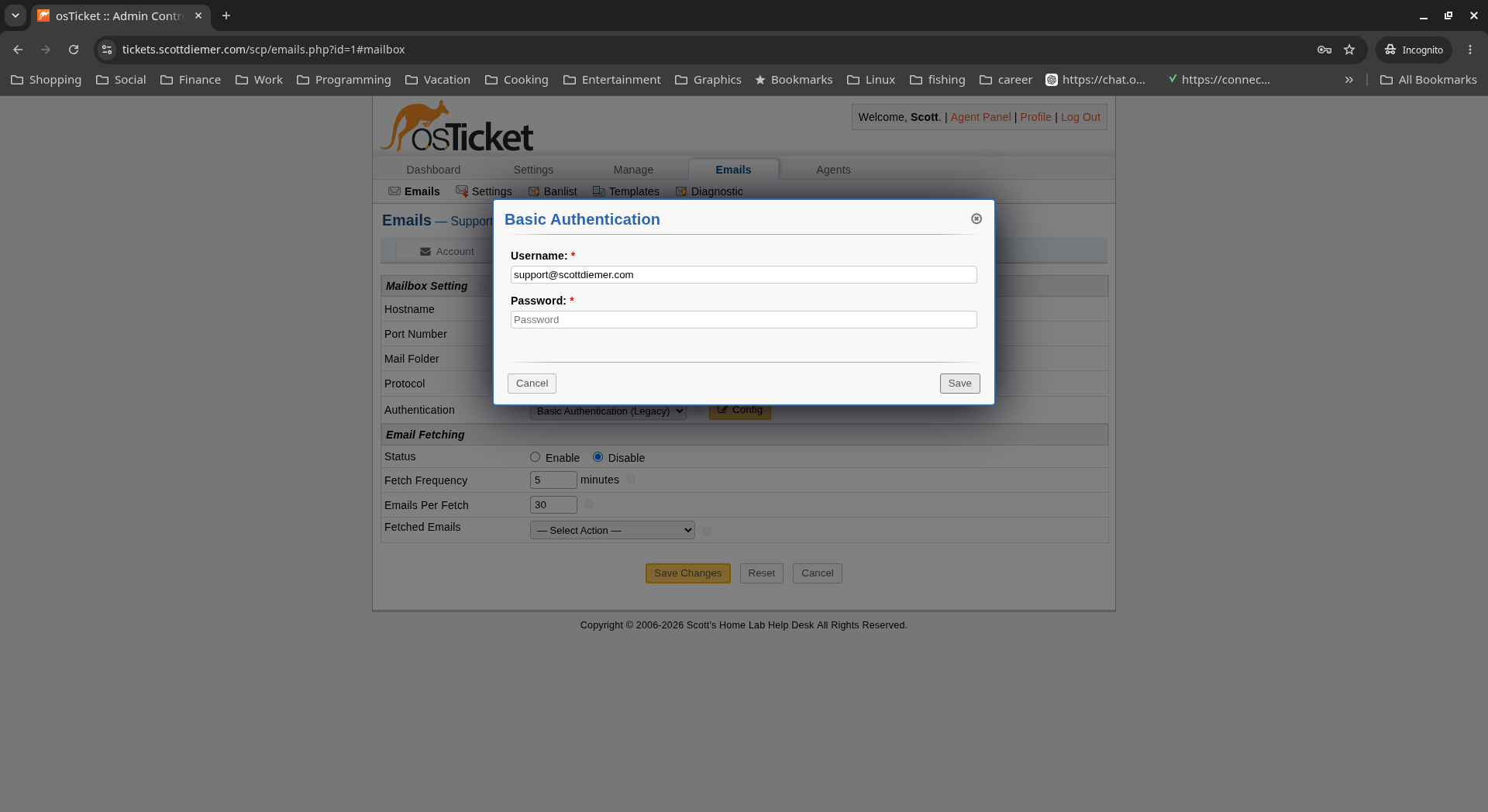 Figure 2: Resolved state — Modal dialogs load clean Basic Authentication interfaces after activating FastCGI location rules.
5. Final Verification & Outcome
With web tier dynamic routing fully functional, I completed the production setup by configuring osTicket's mail transport layers:
-
Inbound Email (IMAP): Configured authenticated SSL mail fetching over port 993 to automatically convert incoming emails into tickets.
-
Outbound Email (SMTP): Established secure SMTP delivery over port 465 for automated ticket confirmations and agent notification dispatch.
-
System Stability: Monitored system logs to ensure clean parsing of all internal AJAX requests with zero 404/500 FastCGI fallback errors.
This build demonstrates the hands-on system administration required to run web applications outside their default stack recommendations, resolve low-level web server rewrite issues, and deliver stable live production services.